How to Integrate AI into Existing Business Software Without a Rebuild: An API-First Playbook
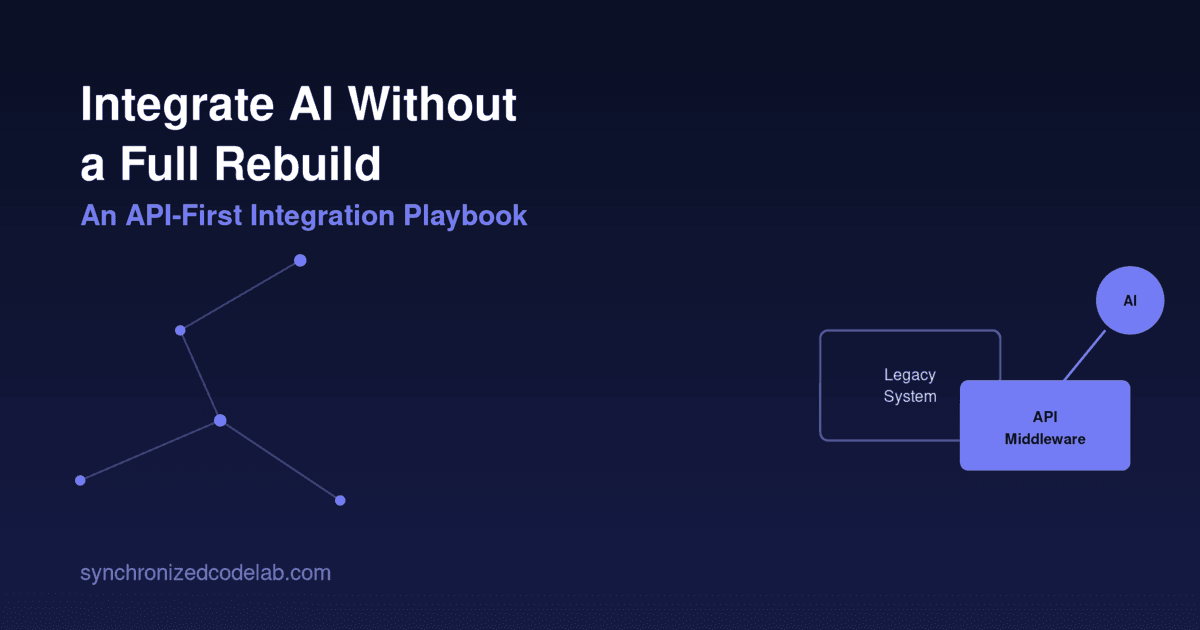
A practitioner-level playbook for bolting AI onto legacy systems via an API/middleware layer — architecture patterns, data triage, phased rollout, and fallback logic included.
You integrate AI into an existing system by inserting an API-first middleware layer between your legacy application and the AI provider — not by rewriting the core system. This layer handles authentication, data shaping, confidence scoring, and fallback logic, so the AI capability can be added, tested, and rolled back independently of the underlying codebase. Every legacy system we have retrofitted at Synchronized Codelab — from decade-old ERPs to monolithic Rails and .NET platforms — followed this pattern, and none required a rebuild to ship production AI features.
How do you integrate AI into an existing system without rebuilding it?
You treat the AI capability as an external service the legacy system calls, never a component it depends on internally. A thin orchestration layer — typically a set of stateless microservices or serverless functions — sits between your existing application and the model provider (OpenAI, Anthropic, Azure OpenAI, or a self-hosted model). The legacy system sends a request over an existing integration point (a webhook, a message queue, or a REST call your app already makes), the middleware enriches and formats that request, calls the model, validates the response, and returns a structured payload the legacy system already knows how to consume.
This works because most legacy systems already have an integration seam — a place where they call external services, whether that's a payment gateway, a tax calculator, or a shipping API. AI integration reuses that seam instead of touching the domain logic, database schema, or UI layer. We've done this on systems where nobody on the current team understood the original codebase; the middleware layer didn't need them to.
What architecture pattern should you use to add AI to legacy software?
Three patterns cover almost every real-world case:
- Sidecar middleware (most common). A standalone service deployed alongside the legacy app. It receives requests via API call, queue message, or database trigger, calls the AI provider, and writes results back to a table or callback endpoint the legacy app already polls. Best when you can't modify the legacy codebase directly (COBOL, old PHP, vendor-locked ERPs).
- API gateway enrichment. If you run an API gateway (Kong, Apigee, AWS API Gateway) in front of the legacy backend, add AI as a request/response transformation step — e.g., auto-summarizing a support ticket before it hits the ticketing API. Best when the legacy system is already API-driven internally.
- Event-driven augmentation. For systems on message queues (Kafka, RabbitMQ, SQS), add a new consumer that listens to existing events, calls the AI service asynchronously, and publishes an enrichment event. Best for high-volume, non-blocking cases like fraud scoring, where the legacy flow shouldn't wait on model latency.
In all three patterns, the legacy system's core business logic, database, and UI remain untouched — you're adding a node to the architecture graph, not modifying existing ones. That's also what makes them reversible: disconnect the sidecar or consumer and the legacy system runs exactly as it did before.
How do you know if your data is ready for AI integration?
Most "start with data quality" advice stops there. In practice, you need a triage framework that tells you, per data source, whether it's usable now, usable after light transformation, or not worth touching yet. We score each candidate data source on three axes:
- Accessibility — Can the middleware reach this data via an existing API, a read replica, or a change-data-capture stream without touching production load? If the only path is a nightly batch export, that determines your latency ceiling before you even discuss the model.
- Structure consistency — Does the field you're feeding the model mean the same thing across every record? A "status" field that's been repurposed five times over ten years by different teams will produce a model that's confidently wrong. Run a distinct-value audit before writing a single prompt.
- Label/ground-truth availability — Do you have any historical record of correct outcomes (resolved tickets, approved invoices, accepted quotes) you can use to validate model output automatically? If not, you'll be flying blind on accuracy and need to budget for manual review in phase one.
Score each source red/yellow/green on these three axes. Green sources go into pilot scope. Yellow sources get a transformation task (a normalization script, a lookup table) before pilot. Red sources get excluded until you have budget to fix accessibility or structure — don't let a red data source block a green one from shipping.
What's a realistic rollout plan: pilot, expand, scale?
A phased rollout controls blast radius while you learn the model's real failure modes on your data — which almost never match its behavior on benchmark data.
Phase 1 — Pilot (2-6 weeks). Pick one workflow, one user segment, and one success metric. Run the AI output alongside the existing manual or rule-based process (shadow mode) before letting it make any decision autonomously. Log every input/output pair. This phase exists to surface edge cases, not to prove ROI — don't kill a pilot because early accuracy is 80% instead of 95%; that's what phase 2 is for.
Phase 2 — Expand (1-3 months). Turn on live output for the pilot segment, add confidence thresholds (below X%, route to human review), and expand to two or three adjacent workflows that share the same data source. This is where you build the fallback and monitoring infrastructure described below — it needs to exist before you expand user exposure, not after an incident forces it.
Phase 3 — Scale (ongoing). Roll out to the full user base, add cost controls (batching, prompt compression, model tiering — cheaper model for easy cases, stronger model for edge cases), and set a monthly review cadence for drift, cost, and accuracy. Gartner projects 40% of enterprise applications will feature task-specific AI agents by 2026, up from under 5% in 2025 — the organizations hitting that curve treat scale as a distinct engineering phase with its own budget, not an afterthought of the pilot.
How do you handle AI failures or low-confidence outputs in production?
This is the part most "AI integration" content skips entirely, and it's the difference between a feature that survives contact with production and one that gets disabled after the first bad incident.
- Confidence thresholds, not binary pass/fail. Every model call that returns a classification, extraction, or recommendation should also carry a confidence signal (log-probabilities, a self-reported confidence field, or an ensemble agreement check). Set a threshold below which output routes to a human queue instead of auto-applying.
- Circuit breakers on the AI call itself. Wrap every model call in a circuit breaker (Hystrix-style, or a simple sliding-window error-rate check). If the provider's error rate or latency spikes, the circuit opens and the system falls back to the pre-AI behavior automatically — the legacy rule-based logic you already had, not a blank error state.
- Graceful degradation, defined per feature. For a support-ticket triage feature, degradation might mean falling back to keyword-based routing; for a document extraction feature, flagging the document for manual entry instead of blocking the workflow. "Just show an error" is not a degradation plan.
- Timeouts tuned to the workflow. A real-time chat assist can tolerate a 2-3 second timeout with a fallback message; a batch document job can tolerate 30 seconds with a retry. Using the same default for both is a common cause of avoidable failures.
- Structured output validation. Never trust a model's JSON output structurally — validate it against a schema (JSON Schema, Pydantic, Zod) before it touches your data layer. A malformed or hallucinated field should trigger the same fallback path as a provider outage.
Why does API-first beat a full rebuild for adding AI capability?
Rebuilds fail more often than they succeed, cost multiples of an integration project, and freeze feature delivery on the legacy system for 12-24 months of opportunity cost. An API-first middleware layer ships incremental value in weeks, is independently testable and rollback-able, and doesn't require the team to fully understand or migrate away from the existing codebase.
McKinsey's 2025 State of AI research found 88% of organizations now use AI in some form, yet the majority remain stuck in pilot or single-function deployment — only around a third have scaled AI across multiple functions, and roughly 6% report AI meaningfully moving their bottom line. The gap isn't model quality; it's that most teams never built the integration architecture — confidence thresholds, fallback logic, phased rollout discipline — that turns a working pilot into a production system that survives real traffic and edge cases. That architecture is exactly what an API-first middleware layer is designed to provide, on top of the system you already have.
FAQ
Do I need to rewrite my legacy backend to add AI features?
No. In almost every engagement we've run, an API/middleware layer inserted at an existing integration seam (webhook, queue, or REST call) is sufficient. A rewrite is only justified if the legacy system has no viable integration point at all, which is rare even in systems 15+ years old.
How long does an AI integration pilot typically take?
A scoped, single-workflow pilot with shadow-mode validation typically takes 2-6 weeks, assuming the target data source scores green or yellow on the accessibility/structure/label triage. Multi-source or heavily regulated workflows (healthcare, finance) usually take longer due to compliance review.
What happens if the AI model gives a wrong answer in production?
A properly built integration routes low-confidence or schema-invalid outputs to a human review queue or a rule-based fallback automatically, rather than applying the output directly. This is handled in the middleware layer via confidence thresholds, circuit breakers, and structured output validation — the legacy system is never exposed to unvalidated AI output.
Should I use a third-party AI API or self-host a model?
Start with a third-party API (OpenAI, Anthropic, Azure OpenAI) for the pilot — it removes infrastructure risk while you validate the use case. Self-hosting becomes worth evaluating once you have predictable, high-volume usage and specific data residency, latency, or cost requirements that a hosted API can't meet.
How much does it cost to integrate AI into an existing system?
Cost depends primarily on integration complexity (how many systems the middleware touches) and data readiness (how much transformation the triage phase requires), not on the AI model itself — model API costs are usually a small fraction of total project cost for a well-scoped pilot. Expect the middleware and fallback infrastructure to be the larger line item, not the model calls.
Can I add AI without touching my database schema?
Yes, in the sidecar and event-driven patterns, the AI middleware typically writes to its own tables or a cache layer rather than modifying the legacy schema. This keeps the integration reversible and avoids migration risk on a system you may not fully understand.
Related Articles
Multi-Agent AI Systems: When They're Worth the Cost (And When They're Not)
Multi-agent AI systems beat single agents by 90% on parallel tasks but cost 15x more in tokens and can perform 39-70% worse on sequential work. Here's the decision framework CTOs and founders need before committing engineering budget to multi-agent orchestration.